


To check PM Kisan status by Aadhaar card:
- Visit pmkisan.gov.in
- Click on “Know Your Status”
- Select “Know Your Registration Number”
- Enter your 12-digit Aadhaar number
- Enter OTP on your Aadhaar-linked mobile.
Eligible farmers receive Rs. 6,000/year in three installments of Rs. 2,000 each. The 22nd installment was released on March 13, 2026. The 23rd installment is expected in June-July 2026. eKYC is mandatory for all registered beneficiaries.
The PM Kisan installment has a way of showing up like a trusted friend who never forgets a promise. You mark the calendar, you make small plans in your head and you count on that amount reaching your bank without fuss. Under the Pradhan Mantri Kisan Samman Nidhi scheme, this support is meant to be steady and direct.
But you know right? Real life is rarely that neat. A missed credit message can stir up all sorts of questions. Has the payment been processed? Is your name still listed as a beneficiary? Did a minor mismatch in Aadhaar details cause a hold-up? When each installment plays a role in managing farm expenses and home needs, waiting without clarity feels frustrating.
That is where a simple PM Kisan status check aadhaar makes a difference. With your Aadhaar card, you can quickly confirm your payment details and beneficiary status online. No guessing, no depending on word of mouth, just clear information you can see for yourself.
Curious how to do it step by step? Let’s break it down below.
What is the PM Kisan Samman Nidhi Scheme?
Most farmers don’t need big speeches. They need steady support. The PM Kisan Samman Nidhi scheme was started by the central government to give small and marginal farmers some direct financial help. Under this scheme, eligible farmers receive Rs. 6,000 in a year. The amount is sent in three parts of Rs. 2,000 each. It goes straight to the bank account. No agent needed and definitely no extra process in between!
The idea is simple. Farming has regular expenses like seeds, fertilizer, labour, transport. And income does not always come at the right time. This yearly support helps manage those gaps.
But for the money to reach smoothly, details must match. Aadhaar should be linked and bank accounts should be active. This is because if something is off, the installment may stop. That is why keeping track becomes important.
What is PM Kisan Status Check by Aadhaar Card?
Now let’s say a farmer is registered. The next thing that usually comes up is this:
“Has the installment come?”
Instead of asking around or waiting for a bank visit, the status can be checked online using the Aadhaar number. This option allows farmers to see:
- If their name is on the beneficiary list
- If their application is approved
- If eKYC is done
- Which installment has been credited
It saves time and it gives clarity. Sometimes payments are delayed because eKYC is pending. Sometimes bank details are not verified. The status page shows where things stand. Once you know the reason, you can fix it. All it takes is the Aadhaar number and access to the registered mobile phone.
How to Check PM Kisan Status by Aadhaar Card Online (Step-by-Step)
You don’t need to be very tech-savvy for this. A basic phone with good internet is enough. Here’s how you can check it step by step:
- First, open the official PM Kisan website by typing pmkisan.gov.in in your browser.
- On the homepage, look for “Farmers Corner.” You will see different options there.
- Click on “Know Your Status.”
- If you don’t remember your registration number, choose the option to search using your Aadhaar number.
- Enter your 12-digit Aadhaar number carefully. Then type the captcha code shown on the screen.
- Click on “Get OTP.” A one-time password will come to the mobile number linked with Aadhaar.
- Enter the OTP and submit.
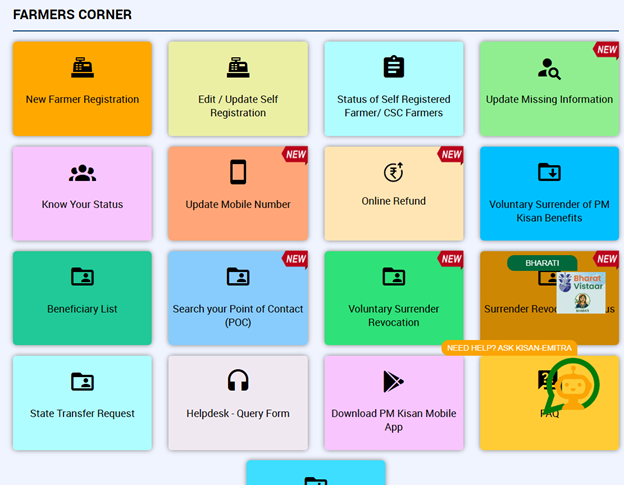
Within seconds, your details will appear on the screen. You can see the payment history and the current status. If everything is correct, you’re set. If something shows pending, you can update or complete eKYC and avoid further delays.
PM Kisan 23rd Installment: Status Check & What to Expect
The 22nd installment was released on March 13, 2026, covering approximately 9.32 crore farmers. The 23rd installment is expected in June-July 2026, following the four-month disbursement cycle.
PM Kisan 22nd Instalment Not Received? Here's Why — and How to Fix It
The 22nd instalment of PM Kisan was released on March 13, 2026, but not every farmer saw Rs. 2,000 reach their bank account. If your status shows “Payment Failed,” “Pending,” or “FTO Generated” and the amount has still not arrived, you are not alone. In most cases, the problem comes down to a small verification issue or a mismatch in records. Below are the most common reasons this happens and what you can do to fix each one.
- Reason 1: eKYC Not Completed (Most Common Reason)
In 2026, eKYC will become mandatory for all PM Kisan beneficiaries. If it is incomplete or expired, the Rs. 2,000 instalment is automatically put on hold even if everything else is correct. You can check this by visiting pmkisan.gov.in. Click on eKYC and enter your Aadhaar number. The portal will immediately show whether your eKYC is complete or pending.
So, how do you fix it? -
- OTP Method: Complete it directly on pmkisan.gov.in using the OTP sent to your Aadhaar-linked mobile number.
- Face Authentication Method: Download the PM Kisan GoI App, log in and use the Face Authentication feature. This works well for elderly farmers because it does not require OTP or fingerprint verification.
- Biometric at CSC: Visit the nearest Common Service Centre (CSC) if your Aadhaar mobile number is not linked or OTP verification fails.
- Reason 2: Aadhaar–Bank Account Mismatch
Your Aadhaar must be seeded with your bank account for the Direct Benefit Transfer (DBT) to work. Many farmers confuse Aadhaar linking with NPCI seeding, but these are not the same. A frequent issue is a name mismatch. If the name on your Aadhaar card is slightly different from the one on your bank account, the system may reject the payment.
For example, “Ramesh” vs. “Ramesh Kumar.”
So, how to fix it? -
- Visit your bank branch and request Aadhaar seeding for DBT.
- Ensure the name on your bank account matches the Aadhaar record exactly.
- After the update, allow two to three working days and check your PM Kisan status again.
- Reason 3: Wrong Bank Account Number or IFSC Code
Incorrect bank details are another common reason payments fail. This often happens when farmers change banks but their old account details remain registered with PM Kisan. Typical status messages include: -
- PFMS Rejected
- Bank Account Validation Failed
How to fix it?
-
- Bank account details cannot be changed directly on the PM Kisan portal.
- Visit your nearest CSC or Block Agricultural Officer (BAO) with your Aadhaar card, updated bank passbook and a written correction request. Remember that updates usually appear in the system within two to four weeks.
- Reason 4: Land Records Not Verified
Payments may also be delayed if land ownership records are not verified by the state government. This often happens in states where land records are still being digitised. Minor spelling errors or outdated ownership records can stop the verification process.
So, how do you fix it? -
- Visit your local Patwari or Tehsildar office with your latest Khasra or Khatauni land records.
- Ask them to update and verify the details linked to your PM Kisan registration.
- You can also raise a request through pmkisan.gov.in. Click on “Help Desk” and then on “Correction in Land Records”.
- Reason 5: Falling Under the Exclusion Category
Not every farmer remains eligible for PM Kisan benefits. The government regularly cross-checks records and removes beneficiaries who fall into excluded categories. Some examples include: -
- Families where any member is a current or former government employee
- Individuals who file income tax returns
- Professionals such as doctors, engineers, lawyers, or chartered accountants
- Institutional landholders
- Farmers with large land holdings in certain states
How to check?
Visit pmkisan.gov.in and then click on “Know Your Status”. If your status shows “Rejected” with a reason code, note the reason and contact your District Agriculture Officer (DAO).
What Details You Can Check in PM Kisan Status
When you open your PM Kisan status page, it does not just show one line saying “paid” or “not paid.” It gives proper details so you can understand what is happening. On the status screen, you can usually see:
|
Your name as registered under the scheme |
|
Your registration number |
|
Aadhaar verification status |
|
eKYC status |
|
Bank account details linked with the scheme |
|
Installment release date |
|
Payment credit status |
And this is important. Sometimes the installment is released from the government’s side, but the bank transfer fails because of a mismatch in details. The status page helps you spot that gap. It also shows if your application is under review or rejected. If there is an issue, you do not have to guess. You can see the exact stage and take action.
Mandatory Requirements for Receiving Payments
Many farmers register successfully but still face payment delays. In most cases, it comes down to a few basic requirements. Here is what must be in place:
|
Requirement |
Action if Missing |
|
Aadhaar linked to bank account (NPCI seeding) |
Visit bank branch for DBT seeding |
|
eKYC completed |
Complete via OTP, biometric, or face auth |
|
Active bank account with correct IFSC |
Correct at CSC or BAO office |
|
Land records verified by state |
Visit Patwari or raise Help Desk request |
|
Farmer ID (new registrations, 14 states) |
Register via state AgriStack portal |
Farmer ID: New 2026 Requirement You Must Know
Starting 2026, the government has introduced a digital Farmer ID under the AgriStack initiative. This is important to understand correctly because there is confusion around who actually needs it.
|
Farmer Category |
Farmer ID Required? |
|
Existing registered beneficiaries (all states) |
No — only eKYC is required |
|
New registrations in 14 states* |
Yes — mandatory from 2026 |
|
New registrations in other states |
Not yet required |
14 states include: Andhra Pradesh, Assam, Bihar, Chhattisgarh, Gujarat, Karnataka, Kerala, Madhya Pradesh, Maharashtra, Odisha, Rajasthan, Tamil Nadu, Telangana, and Uttar Pradesh.
If you are a new farmer registering in any of these 14 states, visit your state’s agriculture department portal or the AgriStack platform to create your Farmer ID before registering for PM Kisan.
PM Kisan Instalment Details Explained
Under the PM Kisan scheme, the total yearly support is Rs. 6,000. But it is not paid in one go. Here is how it works:
- Rs. 2,000 is paid in the first installment
- Rs. 2,000 is paid in the second installment
- Rs. 2,000 is paid in the third installment
The amount is transferred directly to the registered bank account through Direct Benefit Transfer.
Each installment is released after verification. That is why keeping records updated is important. If your previous installment was credited but the next one is delayed, check the status page. It often shows the reason clearly. Over time, these three payments together create steady support during different farming seasons.
At SMC Insurance, we often see how regular financial support can make a difference in a family’s stability. Government schemes like PM Kisan provide a base layer of income support. And when combined with the right insurance cover, families can stay protected even during unexpected events like illness or crop loss.
Steps to Update OTP-Based e-KYC
Sometimes when you check your PM Kisan status, you may see one line that stops everything: e-KYC pending. And until that is done, the installment may not move forward. The good part is, OTP-based e-KYC is simple. You can do it from home if your Aadhaar mobile number is active. Here’s how you can complete it:
- First, visit the official PM Kisan website at pmkisan.gov.in.
- On the homepage, look for the e-KYC option under the Farmers Corner section. Click on it.
- Enter your 12-digit Aadhaar number carefully.
- Type the captcha code shown on the screen and submit.
- Now click on “Get OTP.” An OTP will be sent to the mobile number linked with your Aadhaar.
- Enter that OTP and submit.
If everything matches, your e-KYC will be completed instantly. You will see a confirmation message on the screen. But remember, this only works if your mobile number is already linked with Aadhaar. If not, you’ll need another method.
Steps to Update Biometric-Based e-KYC
Now let’s say your mobile number is not linked with Aadhaar. Or OTP verification fails. In that case, biometric e-KYC is the next option. This method requires fingerprint verification. So you will need to visit a nearby Common Service Centre (CSC) or authorized service center. Here’s what usually happens:
- Visit your nearest CSC with your Aadhaar card.
- Tell the operator you want to complete PM Kisan e-KYC.
- Provide your Aadhaar number.
- The operator will capture your fingerprint through a biometric device.
- Your details will be verified instantly through Aadhaar authentication.
- Once the fingerprint matches, your e-KYC is updated in the system.
- You may receive a confirmation message on your registered mobile number.
This method is helpful for farmers who do not use smartphones or whose mobile numbers are not updated.
Steps to Update Face Authentication-Based e-KYC
There is also a newer option available now - face authentication. This method is useful if fingerprint verification does not work properly. And you can complete it using a smartphone with a camera. Here’s how it works:
- Download the official PM Kisan mobile app from the app store.
- Open the app and choose the face authentication e-KYC option.
- Enter your Aadhaar number.
- Allow the app to access your camera.
- Follow the on-screen instructions to scan your face properly. You may be asked to move slightly so the camera captures your features clearly.
- Once your face matches the Aadhaar records, verification is completed.
- You will see confirmation on the screen.
This method saves time, especially for elderly farmers whose fingerprints may not scan easily.
How to Check PM Kisan Beneficiary Status Aadhar Without Registration Number?
It happens a lot. A farmer registers, time passes and the registration number gets misplaced. Then when it’s time to check the installment, that number is nowhere to be found. But you don’t actually need it. You can still check your beneficiary status using your Aadhaar number or mobile number. Here’s how:
- First, go to the official PM Kisan website at pmkisan.gov.in.
- On the homepage, find the Farmers Corner section.
- Click on Know Your Status.
- If you don’t have your registration number, select the option that says Know Your Registration Number.
- Now choose how you want to search. You can enter your Aadhaar number or your registered mobile number.
- After entering the details, click on Get OTP.
- Enter the OTP sent to your phone.
- Once verified, your registration number will be shown. From there, you can check your full beneficiary and payment status.
So even if that number is lost, you’re not stuck.
PM Kisan Status Check Online Through Mobile Phone
You don’t need a computer for this. A basic smartphone with internet is enough. There are two easy ways to check your status using your phone.
Option 1: Through the Website
- Open your browser and type pmkisan.gov.in.
- Scroll to Farmers Corner.
- Tap on Know Your Status.
- Enter your Aadhaar number or registration number.
- Complete OTP verification.
- Your status will appear on the screen.
Option 2: Through the PM Kisan Mobile App
- Download the official PM Kisan app from the app store.
- Install and open it.
- Choose the status check option.
- Enter your details and verify with OTP.
- Your payment and beneficiary details will be visible instantly.
This makes it easier for farmers in villages who rely mostly on mobile phones.
PM Kisan Helpline for Status Issues
If the website shows an error or payment is marked released but not credited, contact the PM Kisan helpline:
|
Channel |
Details |
|
Helpline Phone |
155261 or 011-24300606 (working hours) |
|
|
pmkisan-ict@gov.in |
|
Kisan-eMitra Chatbot |
Available on the PM Kisan portal — AI-assisted support for status and eKYC queries (2026 addition) |
|
Local office |
Visit your District Agriculture Officer (DAO) for land record or rejection issues |
Benefits of Checking PM Kisan Status Online
Checking your status regularly may seem small. But it can prevent bigger problems later.
Here’s a simple look at why it matters:
|
What You Do |
What You Gain |
|
PM Kisan payment status check aadhaar |
Know if installment is credited |
|
Verify eKYC status |
Avoid payment hold |
|
Review bank details |
Prevent transfer failure |
|
Track installment dates |
Plan expenses better |
|
Confirm beneficiary approval |
Ensure eligibility is active |
When you stay updated, you avoid last-minute stress.
Must-Read Guides From SMC
To Sum It All Up,
The PM Kisan scheme has become an important support system for many farming families. The money may not solve everything, but it helps cover regular expenses and reduces pressure during tough months. And the best part is, checking your payment or beneficiary status is simple. With just an Aadhaar number and a mobile phone, you can see if your installment is released, if eKYC is complete, or if something needs correction.
Small checks like this save time. They prevent delays and also help you stay in control instead of waiting and guessing.
Disclaimer:The information provided on this platform is intended for general awareness and educational purposes. While every effort is made to ensure accuracy, some details may change with policy updates, regulatory revisions, or insurer-specific modifications. Readers should verify current terms and conditions directly with relevant insurers or through professional consultation before making any decision.
All views and analyses presented are based on publicly available data, internal research, and other sources considered reliable at the time of writing. These do not constitute professional advice, recommendations, or guarantees of any product’s performance. Readers are encouraged to assess the information independently and seek qualified guidance suited to their individual requirements. Customers are advised to review official sales brochures, policy documents, and disclosures before proceeding with any purchase or commitment.
FAQs
Yes, Aadhaar linking is compulsory. Without Aadhaar verification and eKYC completion, installments may stop.
Visit the official PM Kisan website. Go to Farmers Corner and click on “Know Your Status.” Enter your Aadhaar number and verify using OTP. Your payment and beneficiary details will appear on the screen.
Yes, you can retrieve your registration number using your Aadhaar number or registered mobile number on the portal. After that, you can check your status easily.
If you complete OTP-based eKYC successfully, it is usually updated instantly. In some cases, system updates may take a short while.
First, check your registration status online. Ensure your land records and Aadhaar details are correct. If needed, contact your local agriculture office or call the helpline for assistance.
Some of the common reasons are eKYC not completed, aadhaar not linked properly, bank account issues, land record verification pending, etc. Check your status online to see the exact reason.
Go to the PM Kisan website and click on eKYC under Farmers Corner. Enter your Aadhaar number and the system will show whether your eKYC is completed or pending.
Eligible farmers receive Rs. 6,000 per year. This amount is paid in three installments of Rs. 2,000 each.
If your name or number does not match Aadhaar records, update the correct details either:
- Through the PM Kisan portal, if editing is allowed
- Or by visiting your nearest Common Service Centre
- Or by updating Aadhaar details at an Aadhaar enrolment center
Once corrected, complete eKYC again to avoid further delays.


